Wednesday, June 22, 2011

Apple unafraid of, helping Facebook's Project Spartan


Techcrunch had announced last week the Spartan project, an ambitious project that could allow Apple to compete with Facebook and iOS leaving its own App Store in HTML 5. The site is back on this project, without giving details, but added interesting information about Apple.

According to the site, Apple is not afraid Spartan project, on the contrary. The company would provide technical assistance to the social network to help set up his shop dedicated to applications in HTML 5. Two reasons cited by TechCrunch: Apple is not afraid of Web applications offered by Facebook. According to MG Siegler, native applications are much better, and users will no doubt continue to choose them, at least in the majority. Otherwise, this platform encourages developers to abandon the Flash to create applications for Facebook, in favor of HTML 5. Technological change that is not displeasing to a company that puts itself before the HTML 5.

Remains that Apple underestimated the impact of a boutique Facebook beyond the control of the App Store, however, says TechCrunch, adding that the project Spartan is causing the delay of the application iPad. If its development has taken so long, it is precisely because the social network wants to make it compatible with Spartan.

Monday, June 20, 2011

New research in the iPad page with iOS 5


With iOS 5, Apple changed the presentation of research within a web page in Safari mobile iPad. Until then, it was necessary to enter the (s) term (s) sought (s) in the Google search box to initiate a search within a web page.

With iOS 5, a specific field was added above the keyboard of the iPad. It is not permanent, but only when the user performs a tap into the Google search box. The result is then directly highlighted, while the arrows to navigate between different occurrences.

This new format is valid only for the iPad. In IPhone or iPod touch, always type the query in the box dedicated to the search engine and scroll down the results to initiate a search in a page.

Sunday, June 19, 2011

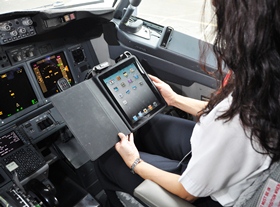
iPad for American Airlines pilots


American Airlines, the third large company in the world (612 aircraft), decided to follow Alaska Airlines and replace paper manuals drivers by iPad. The change would allow the company to save $ 1.2 million per year simply by gasoline, manual paper weighing at least 15 kg. Initially, the device will be tested on two flights between Los Angeles and Tokyo and Los Angeles and Shanghai. The iPad was declared by the U.S. administration as an electronic device used during takeoff and landing, the sine qua non for the replacement of paper manuals.

If the drivers are entitled to an iPad, American Airlines customers will have their side of the Galaxy Tab, at least those who travel first class or business. The company has signed a partnership with Samsung to provide its customers 6000 tablets Android. The latest Galaxy Tab 10 inches were chosen to accompany some flights to the United States and around the world. Boeing equipped with multiple shelves also offer Wi-Fi, what casual browsing on the shelf during the flight. The tablets will be specific, we assume that the system will be crippled and we know that Samsung will load videos in HD.

Saturday, June 18, 2011

Weekend Calendar HD removed


We learned a few days ago that Week Calendar HD disappeared from the App Store. This calendar iPad took over the native interface of the application by adding many features. Its removal is not motivated at first; we thought it was related to the duplication of functions offered by Apple from iOS 5.

The designers of the application have been received explanations on the sudden withdrawal. As they explain on their website, Apple has found the application interface too close to that of the native calendar for its pop-up giving more information about an event.


The only problem is that pop-up is created automatically by EventKitUI, a framework proposed by Apple developers ... developers of the application defend themselves: they used it as the documentation requested.

Undeniably, this withdrawal from the App Store is a mistake for Apple to be, one can only hope, quickly corrected. We assume that the person requesting the withdrawal of the application was unaware of the existence of EventKitUI and that an excess of zeal that it did so. Until more information is hard to imagine that this withdrawal is a sign of a change in policy from Apple.

Friday, June 17, 2011

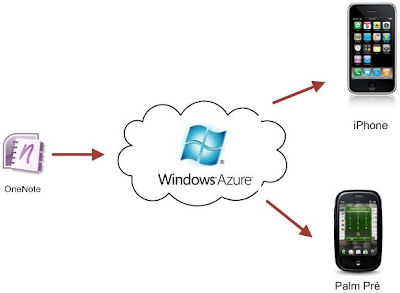
Is iCloud going to use Windows Azure!?


In recent weeks, Mary-Jo Foley, a journalist specializing in Windows for ZDNet, has received several indications that Apple would use Windows Azure, the platform-as-service Microsoft. She was dismissed out of hand these rumors, but the assumption seems to be confirmed now iCloud was presented.

Sending an image IMessage causes authentication to servers Windows Azure. The study of communications network connected to IOS devices icloud indeed shows contacts with Windows Azure servers and Amazon AWS in addition to Apple's servers, as shown, for example Apple Infinite. GigaOM has sought advice from three experts from the cloud: if two do not think that such communications be sufficient evidence, the third draws an explanation of interest.

Apple already has data centers, used especially for MobileMe and updates of software. They are however not sufficient to properly distribute the content around the world: Apple relies on a distribution network (CDN), provided in particular by Akamai and Limelight. The contents are duplicated on thousands of servers around the globe to accelerate downloads. So according to this third expert, Apple would use a similar strategy to icloud: the data center of Maiden would host the master files, but copies are placed on servers Windows Azure (and Amazon AWS) as a cache.

In light of new observations of network traffic on an iPhone with iOS 5, Infinite Apple has another theory: Apple's servers would not be used to store files, but to manage the links between different files, scattered servers, Windows Azure and Amazon AWS, as close to their users.

In any case in detail, the use of external services for icloud is not surprising. While the data center of Maiden is the ninth largest in the world, but Microsoft up three data centers in the top 10: the Redmond Company has one of the largest accommodation capacity in the world, with a system, Windows Azure that has nothing to prove. Apple is pragmatic on the matter: she knows the world of data center is not his strength, and does in fact not a single Mac in the Maiden. Windows Azure is also a product that Steve Jobs knows well: his other company, Pixar, had worked in the cloud version of its rendering engine, system demonstration in the Microsoft cloud.

Thursday, June 16, 2011

Firefox could lose the support of Ubuntu


The Linux world is much more complex than Windows or Mac OS, with a large number of distributions can be very different. If anyone who knew how to stand out, however, it is Ubuntu. The distribution is used by millions of people around the world and even if that system is far from the success of Apple's and Microsoft, its weight in the Linux world is enormous.

So when Mark Shuttleworth, CEO of Canonical, the company behind Ubuntu, is in favor of abandoning Firefox as the default browser of its system in favor of Chrome, the information does unnoticed. The man is known for its radical choices and often disputed, such as a completely new interface (Unity) in Ubuntu 11.04. We also knew Mark Shuttleworth fan of Google products and think clearly to impose his views by putting forward the browser from search giant.

Nothing is done yet and the next version of Ubuntu numbered 11.10 and expected to fall still keep Firefox as default browser. Even following the 4.12 that should land in spring 2012, could still keep Firefox as the default choice, but it might be the last version.

For inexperienced users, this change would be insignificant because they can always install Firefox and make it the default browser. But for all new users attracted by the simplicity Ubuntu, it certainly means a change in browser. Firefox is not in great shape these days, here's some news that should not help the Mozilla browser, if it ever materializes.

Ripit available in discount rate!!!


If you have a large collection of DVDs and a large hard disk, Ripit is the ideal tool to store all those DVDs to the hard drive. This utility creates archives in ". DVD media" which are fully recognized by the DVD player for Mac OS X. Ripit interface is very simple and has few options: the whole DVD is imported; you can simply change its name. The application is also able to compress a DVD into a compatible version of IOS for example. Mac Update today offers the only 50% discount, $ 9.99 instead of $ 24.95.

iStat Menus prepares for the arrival of new Mac OS X Lion. The latest version of this utility that displays in the menu bar of Mac OS X more information about the Mac improves its compatibility with Mac OS X 10.7, but the publisher did not specify what's new.

Default Folder X overrides the windows open and save files in Mac OS X to add their many functions. This utility changes to the system; it was not compatible with Mac OS X Lion. This new version is beginning to be compatible with the new cat from Apple, even if there are many bugs and if the functions are all present. This version also adds some multi touch gestures, and fixes many bugs.

Wednesday, June 15, 2011

QuarkXPress 9 Part.III


The tool "Publisher history" (Story Editor) is to display the text of a page layout in an interface similar to that of a word processor. The text can be read in a different font and a body of the model without affecting the formatting of the layout. The text changes have a direct impact and are instantly reflected in the model. This tool will be useful if the text of the model is very small, rotated or distributed across multiple pages.

The tool "ImageGrid" function targeted for photographers and graphic designers. It helps to create a contact sheet with little difficulty. The tool can import a folder of images and automatically build a catalog with many options for page layout. Each image can be associated with its file name and be indicating its resolution and size. The number of pages will also be determined by the number of images and their size indicated in the setting box.
Leo: full screen mode unsuitable for multi-monitor configurations. During the presentation of Mac OS X Lion, Steve Jobs has placed great emphasis on the fact that many innovations were inspired by IOS. Full screen mode is the same illustration.

Many applications come with Mac OS X 10.7 use. This is the case among others Safari, Preview or Mail. In some cases, this new method is very convenient. We find this type of use that is sometimes the strength of the iPad (but also its weakness) is the possibility of being able to focus on a specific task.

Unfortunately, this method was not designed for configurations with multiple screens. When you activate this mode, the second monitor is useless. It is not possible for example to use another application on it. This is unfortunate, because there were better things to do.

This behavior with every version has not changed. And given the status of the system, it's a safe bet that the way it is managed by mode does not change its marketing.

Note finally that builds succeed, and Front Row is still not showing. Those who used the media center of Apple will have to be a reason...

QuarkXPress 9 Part.II


The tool "ShapeMaker" (below) allows the creation of forms from simple to more complicated. The mere wave of a block in a spiral or a complex polygon, all types of blocks are possible. The dialog box provides an overview of real-time convenient for viewing directly the development of the block in which all parameters are customizable.

Entire page could with earlier versions of XPress, but required the stunt (mode railway ...) and worked only from one document to another. This time, we can affect any part of the document or one or more pages within a single project. The dialog box lets you choose what to copy and the destination area. It will choose the options to complete the copy operation in the current layout, a new file in a new layout ... or by splitting into single pages or splitting the layouts in the project. Many options are comprehensive and indispensable.
"Linkster" is also a tool that can be described as obvious. It fills a gap in the options of linking text blocks. He knows indeed loose blocks and keeps the entire text without causing overflows. All the text of each block of a chain remains in the block after hairline. The dialog is very well designed and allows, for each option selected; understand the impact on the existing block chaining.

The "bullet style, numbering plan and" is it, any kind of structured document according to a precise indentation. Not necessarily very useful model releases, this function will be of great help in editing and everything that affects directly or indirectly to the book. It allows selecting and applying automatically to all the paragraphs style bullet or numbering via a drop down menu. Each style plan has nine levels of indentation. The dialog box allows you to finely manage all of the parameters of indentation.
(Cont.)

QuarkXPress 9 Part.I


Now over 25 years that the veteran of the layout is to work. Mock press advertising XPress ... went from the golden age of electronic publishing to the even more modern, cross-media publishing with line of sight iPad and all that matters tablets on the market electronic reading lights. Launched a few weeks ago, QuarkXPress 9 is still not able to export its contents to the iPad. It was not until the end of July to have this opportunity as a free update. For now, we have only a brilliant demonstration of the publisher of the export module in Quark QPS to ensure the full potential of the tool "AppStudio". It is very easy to use and will convert the models into interactive content for iPad.

Nothing distinguishes the version 9 of the previous one, except the home screen of the software. No effort to take control of the interface is therefore requested.

Meanwhile the extension "AppStudio" XPress itself to export its content to various industry standards. We can convert our documents into electronic books in ePub format (for Apple iBooks, the Amazon Kindle ...) or for the electronic reader Blio eReader. The tools allow XPress easily redefine the formats of models specific to these formats while defining the different meanings of reading. Tools used by any designer "paper", which should be the same philosophy for the tool "AppStudio" and the transposition to the iPad. Still, the layout for a reading lamp and a print magazine does not carry the same creative imagination and it will take getting used to manipulate the tool in getting rid of paper patterns.

XPress does not miss the turn to digital publishing, but does not neglect his business. The design and publication of paper documents are still the heart of the target and the ninth version brings some new tools. They consist mainly of changes in this version. One also wonders why some of them (e.g. Clone) were not incorporated into the software from version 3.32 ...
(Cont.)

The server for all Mac OS X Server Lion Part.II


By default, the Server Admin application that allowed far more depth to configure the system is not even installed in Mac OS X Lion. One can nevertheless add, and with it the set of tools dedicated to the server configuration that will take place in / Applications / Server.

The Admin Server no longer supports Mac OS X Lion in that which is not managed by the application server. Only certain services, or some advanced options are accessed through its interface. Most users with only limited needs and will not even have to use Server Admin to be a must on the contrary, in more complex configurations.

Server-side preferences are indeed very small. Apple took a big household, leaving only the options that are strictly necessary in the context of use with a Mac Mini Server for a small business for example. The interface is simple, many explanations: the audience for this new application is very different from the Server Admin.

On average, Apple has simplified its system server, but some new features should also satisfy the most demanding users. One example among others, Open Directory (centralized directory service) can now be restricted based on client IP addresses. This is useful for large companies who must manage a large fleet of machines with a single shared directory.

This is one of the biggest new features of Mac OS X Server Lion: a profile manager for IOS devices and Mac OS X. This system allows you to configure mass of iPhone, iPod touch or iPad by simply passing through a web interface. The terminals can be configured as standard (password required, VPN, etc.), But also managed remotely (that is to say, deleted, locked or unlocked).

With Leo, the system is added to Apple computers, provided only that they run on Mac OS X Lion. A network administrator can configure and manage remote machines much easier than before.

The server for all Mac OS X Server Lion Part.I


With Leo, Apple Exchange Server is in depth the variation of its system. Until Leopard, Mac OS X Server cost € 500 for 10 users, or € 1000 without limit with version 10.6, Apple had already lowered its prices by removing the version limited to 10 users, and not selling more than the unlimited version to € 499.

Apple goes much further in its next system since the company removes just Mac OS X Server as a system and makes an application for Mac OS X Lion client. As of July, for € 39.99 only, any Mac running on Lion will become the server and perform all the functions previously reserved for Mac OS X Server. A major change that goes in the direction of a general simplification of server functions: Apple aims to create nothing less than "the server for all’.

For all, that is to say for every budget, but also all the machines. While Mac OS X Server was rather designed to run on the Xserve, Mac OS X Server version lion can run on any Mac, as shown it very well the Apple site. Prior warning before you install the Server configuration back to a Mac OS X Lion client is difficult. In the current version, Apple offers no simple way to go back, it is necessary to reinstall the system. However, Mac OS X Server configuration lion looks like two peas in Mac OS X Lion client (even this is Photo Booth ...) and it is quite possible to install the Server on a machine to be used for everyday use.

Mac OS X Server Lion, Apple offers an entirely new application configuration for the server. Server named simply, this application provides easy access to some of the options for Mac OS X Server and somehow replace the server preferences from previous versions. For this application, you can manage users and groups, the various services or get some useful information on the server.
(Cont.)

Tuesday, June 14, 2011

Samsung versus Apple


In the case between Apple Samsung backdrop of patent infringement, design and trademarks and unfair competition, Apple has applied for and obtained permission to dissect the prototype from Samsung. The Korean company has responded by asking to see the prototypes of the upcoming iPhone and iPad.

There is a fundamental difference between these two queries: Apple wants to see prototypes of products discovered and widely known even then that Samsung wants to see prototypes of products that nobody knows anything. We notice the difference in official documents: while Apple has asked for such and such a model using names, Samsung is sticking to a very cautious "iPhone 5 or 4GS, or whatever his name. Several scholars have thus noted that if the application Apple was fairly common, the Samsung was much less and had little chance of success. It poses the question of permeability between the legal department and other branches of the conglomerate, and potential risks of industrial espionage: whereas Samsung products, although not marketed, were largely revealed by the press or by Samsung itself, those Apple has never been seen.

Justice has not yet ruled on the request of Samsung, but Apple has already responded, calling it "attempt to harass" the worst faith. The Korean firm asked Apple to provide versions of "final and trade" of the next iPhone and iPad before next June 13, which the Cupertino company has denied. Apple now refers to the division of Samsung Mobile as the "copier", claiming that the products of the Galaxy "copying technology, user interface and innovative spirit" of the iPhone and iPad. The study of the prototype from Samsung is expected to confirm that fact.

Richard J. Lutton, chief adviser for intellectual property issues at Apple, justifies the denial of his company to provide prototypes to Samsung: "Apple is recognized as one of the most secretive companies in the world". No doubt his view, the motion from Samsung is an attempt to destabilize. The procedure was reactivated on Friday; we should quickly come to the conclusions of this component.

Sunday, June 12, 2011

Expect soon new Mac Pro and Mac mini!!


Once is not custom, the Apple Store did not close its doors during the keynote on Last week. But this is probably only a postponement. The news should be plentiful in the coming weeks.

Furthermore Final Cut Pro X officially announced by Apple to the end, Apple would soon revise the MacBook Air, and an update of the Time Capsule is still valid.

To this list, 9to5Mac adds two new products that would begin to rare server editions of Mac Pro and Mac mini. Nothing too surprising, these products have not been updated since about a year. In recent months, it was rumored that the tower Apple is reviewed in depth so as to enter more easily in the racks of a data.

The entire Mac range is announced with a shipping time of 24 hours at the Apple Store with the exception of core Mac Pro 12 and declination server, both available with a delay greater than or equal to 3 days.

By the way, we note that if one has the right to rumors to the entire Mac range, a machine is beyond this game, it's the white MacBook. Yet it is now the oldest model in the range. Has he gone to meet the same fate as the eMac on the end? The latter was revised only very rarely did before Apple finally abandoned.

Remote Viewer on the Mac iOS


Remote Viewer opens a window on the remote folders on your Mac from an iPad or iPhone. This free utility is the first to BeLight Software IOS. It gives the user a way to browse folders defined in advance of their Mac via Wi-Fi or remote and, when the formats of documents are managed by the system to display the content (images, PDF, iWork, videos, etc.).


It must install on your Mac a server component. The settings are very simple, they give select the folder you want to share and combine it with a username and password. It is accessible from the menu bar.

On IOS, the Remote seeks the Mac server and then displays the file said. Access is by entering the IP number of the machine, or simply on a local network, auto detection.

Once the procedure is self-explanatory, we navigate in the tree of the shared folder and file content is displayed consistent. This also works for mp4 videos, but in our tests - locally - the flow was really not optimal to do in each case and the connection conditions. Finally, the images found on the Mac can be transferred to the album of the iPad / iPhone or sent by email.

Windows XP private icloud


"Using icloud PC requires Windows Vista or Windows 7; Outlook 2010 or 2007 is recommended for access to contacts and calendars", says Apple. Yes, Windows XP is not compatible with icloud, which operate on iTunes yet 10.3 and MobileMe.

Apple has always been very conservative with Windows, preserving a great backward compatibility because of the unwavering support of XP users to their OS. If Vista was not convinced things are different with Windows 7, which is gradually forgetting his great ancestor. As does Microsoft itself, moreover, Apple thus moving towards the phasing out of Windows XP, which remains the operating system most widely used.

Remind all intents and purposes that Apple is much more aggressive with its own OS: it has always supported the version of Mac OS X and the current version. Thus, iTunes 10.3 is only compatible with Leopard and Snow Leopard, and it is not surprising that the media is full icloud as Lion and Snow Leopard.

The iMac 27 "Quad-Core SSD stands up to the Hexa-Core Mac Pro


The iMac 27 "high-end SSD version is a bomb that can stand up to a powerful Mac Pro is the conclusion of a test of Macworld U.S. The two ranges meet very different needs, but there is zones between the two where the iMac may well do meet the performance requirements of some professionals.

Tests of two iMac Quad Sandy Bridge next generation had already shown that the Mac Pro Quad entry received a few lessons from these machines. But the configuration custom made by Macworld drives the point, this time facing the Mac Pro hexa core, the point of making the Mac the most powerful measured so far.

The magazine took an iMac 27 "Core i7 Quad at 3.4 GHz with its 1TB drive and replaced it with a 256 GB SSD The bill then goes from 1900 € to 2600 €. To be exact, Macworld DSS has recovered his iMac Core i5 and installed in 27 "(but more can be done simply by the set of options at the Apple Store) The Mac Pro took in default, it costs € 3599 with a 1 TB hard drive and 3 GB of RAM.


Of the 17 tasks comprising the application testing of Macworld, the iMac went to the Mac Pro in 14 of them. However the number of cores (four and six against both configurations manage hyper threading) gives the advantage to the Mac Pro with some applications. The Mac Pro is 13% faster with Handbrake, 21% in the test of Cinebench CPU and 28% on the test MathematicaMark. It also compares two different generations, the Mac Pro are those of 2010 and expected their cooling.

If we compare this iMac from its hard drive and SSD versions, the second configuration is 18% faster on average. This model SSD is 35% faster in copying a 1GB file, 44% faster in a file decompression, 17.5% faster to open a Word document in Pages and iPhoto import is two times faster. For all that relates only to actions seeking the processor, the difference is - no surprise - insignificant.

Finally, this iMac 27 "face a 21.5" Core in i5 2.7 GHz SSD also shows that the former is generally 16% faster. Task-Finder, file compression iMovie and export the results were either identical or marginally better on the 27 "Core i7.

Logically, the Core i7 took the lead in the processor tasks: 30% faster with Handbrake, with 37.5% and 41.5% with Cinebench, MathematicaMark. It should be remembered that in the new iMac line, all are four cores, but only Core i7 hyper threading manage virtually doubling their number. Finally, although the gain of the SSD is evident in adopting instead the hard disk, divide its internal storage capacity by four face configuration 1 TB

Production of MacBook Air 2011 about to start


Mass production of the MacBook Air is about to begin. For the launch, the Cupertino Company has ordered about 380000 numbers of the MacBook Air2011.

With reference to Concord Securities analyst, Marketing is no longer a matter of weeks. Logically, this new model will adopt the platform Sandy Brige port and a Thunderbolt.


At the developer conference (WWDC), Apple reiterated that its line of ultraportable was selling like hotcakes. Phil Schiller said in particular about her: "It is beautiful, it's light, it is fast. The whole industry is trying to copy".

In fact, DigiTimes reveals that the UX 21 which had caused a stir at Computex would be sold $ 100 less than the ultra-portable Apple configured equally.

Best Property Management Professionals in Arizona

Managing your rental properties are a more time consuming task hence every one prefers to hire a professional. Before selecting the professional you have to check their reliability and experience. Hence, here comes the krk realty in first place. Their well experienced executives and their knowledge give you a best income from your properties. Spending more time with the customer and standing along with them is the specialty of the krk realty. They are having better communication and shows flexibility in time schedule with the customer. This high profile realty management company always welcomes its clients to meet up and discuss future plans. Through their vast knowledge hard work and team work they have a best customer base in and around Arizona. This is the essential qualification for a property management company. The krk realty is having a thorough knowledge of the local market in Arizona. Since they are having best knowledge in local market, it ensures your property is securing the best rent and is seldom vacant. They are charging very nominal one time nominal fee when compare with any other realty management companies. The krk realty is having a best BBB accreditation of A+ for their commitment and good work throughout the year. Either you just log in to their site and register yourself and reap the benefits or call on them at KRK Realty 2501 N. Hayden #101 (Thomas & Hayden) Scottsdale in person.

Friday, June 10, 2011

250 new features of Mac OS X Lion Part.IV


Spotlight
Some discrete improvements in Spotlight, the search built into Leo. First, you can search the Internet and Wikipedia directly from Spotlight. Then two changes on the hit list: you can drag and drop from the menu and you can get a preview with Quick Look all elements with a simple mouseover.

System
Mac OS X Lion facilitates migration from Windows: the system not only collects the personal papers, but also contacts, calendars and mail accounts, but still photos. Many other changes are emerging as a new submission for the module About This Mac, four new languages (Arabic, Czech, Turkish and Hungarian), managing more content for Quick Look, the appearance of definitions from the dictionary with a double gap in a word ...

About this mac
Among the new more anecdotal note still a full-screen mode for the game of chess that always accompanies the system. More interestingly, we have already mentioned the Mac App Store, instant notifications of IOS are introduced in Mac OS X.

The general interface is evolving with the ability to resize a window from any side, or scroll bars disappear when the default does not scroll the content.

Terminal
Some news too, with a more modern terminal (full screen and more options for appearance), but also more sophisticated controls on the statutes and improved support for drag and drop.

Text
Several additions to Mac OS X Lion on the text, often additions from IOS. Taking a letter supported, we obtain immediately the corresponding accented characters.

Mac OS X also adds Lion iOS corrections, but the system automatically changes the language according to context. More anecdotally, Emoji IOS are emerging, the default font collection grows and new languages are supported.

TextEdit
The application of text default Mac OS X starts to taste the Lion with the support of full screen, automatic backups and versions. TextEdit also contains a new formatting toolbar, a search and support of Eye for attachments.

Time Machine
In Leo, Time Machine can backup to local hard disk when the external drive dedicated to the backup is not. It can also encrypt backups.

Privacy
Mac OS X Leo is hosting a new preferences panel dedicated to privacy, including management of geolocation in applications, or even sending a crash report. An icon also appears in the menu bar when an application locates the Mac.


Versions
This new feature is Time Machine a finer scale of a document. The application automatically saves each version and then presents the previous versions in an interface simple to use. We can then recover deleted items using copy / paste and constantly compare the current version and previous versions. In the event of the document, only the final version will be shared (read: Mac OS X Leo: Time Machine and insight into local versions).

Xsan
Xsan system is directly integrated with Leo and allows any Mac to access an Xsan volume. A new preference panel appeared to manage these particular volumes and Lion supports standard ALUA.

250 new features of Mac OS X Lion Part.III


Screen Sharing
In Mac OS X Leo, Screen Sharing now supports user accounts and allows you to connect to a computer already in use with another account (Remote access multi-user). You can also use an Apple ID to authenticate and a new observation mode only makes its appearance.

Photo Booth
It was a (small) surprise at the Keynote, Apple has updated Photo Booth, its application to take pictures with effects. It contains a full screen mode like all Apple applications, but new effects using face recognition. Photo Booth benefits (finally) FaceTime HD cameras and takes pictures in high resolution while videos can be shortened.

Full Screen
Applications can now integrate a full screen mode by default which is already active for applications from Apple. In this mode, only the application remains the dock as the menu bar disappears. Multitouch gestures can go a full screen application to another.

System Preferences
The new preferences system Lion centralize the management of Internet accounts in one preference pane. Some new options are also emerging, like the ability to hide indicators of the dock to open applications or reversing the pad.

QuickTime Player:
New editing capabilities for QuickTime Player and the new combination of multiple videos or video rotation. It can also save only a single part of the screen, whereas in the screenshot, the clicks are highlighted. New sharing options are also included in Leo.

Network
Mac OS X Lion has a new mode that allows access to data via the network without re-enable the entire system, thereby saving electricity. This mode activates neither the monitor nor the USB ports. Among the new features include the appearance of a window when a network requires authentication, support for NFSv4 and SMB addresses with DFS that facilitate reconnection.

Resume
This resets an application or even the entire system in the state where he or she was before her arrest, as in IOS. When turning off the Mac, you can also specify a starting from scratch, as was the case with Snow Leopard.


Restoration
Mac OS X Lion contains a hidden partition that can easily restore the system without optical disk, which is handy given the market only by the Mac App Store. The recovery mode contains several tools, including one that allows you to reinstall (possibly from a TimeMachine backup), but it also includes Safari to do research on your problem.

Safari
Apple's browser starts up to date with a full screen and new touch gestures, including the double tap to zoom and intelligent way to pinch to zoom in IOS. Safari improves support HTML5 and the CSS3, it contains a new list of downloads (a bit of future Firefox Safari) and a reading list for items that you do not want to read immediately (A function similar to Instapaper in Safari 5.1). Safari also practices sandboxing and application contains a new architecture that makes the browser more stable with a separation process.

(Cont.)

250 new features of Mac OS X Lion Part.II


FileVault 2
This is the major update to the document encryption solution for Mac OS X. With Leo, it is now capable of encrypting the entire drive and it also works with external drives (USB and FireWire). FileVault XTS-2 uses AES 128 to encrypt (a solution very secure), access to encrypted data is immediately after entering the password.

Finder
The Finder has a new default view to display all files sorted by category, a new option that was also around the Finder. The search box displays suggestions and intelligently filters the results, like in Mail. It can merge files, create a folder from a group of files or keep multiple files when drag and drop a file that already exists in the destination folder.


iCal
New interface for Apple's calendar application, we have already mentioned on MacGeneration.

iChat
Even if Apple puts more emphasis on FaceTime now, the messaging client iChat is not abandoned historic Lion in the contrary. It now includes Messenger; it offers a unified contact list and a unified status for all registered accounts. We can now perform a search in the iChat buddy list and can be extended by plug-ins.

Launchpad
LaunchPad Application Manager to iOS works just like in IOS or almost. We may set records for applications, delete them directly from the LaunchPad ... Only applications on the Mac App Store are entitled to all functions.


Mac App Store
Integrated with Leo, he also has three new features compared to that which was added to Snow Leopard. First of all purchases in-app that will finally allow developers to offer trial versions that can be clamped to unlock the application. Other new updates faster where only changes from the previous version will be recovered and finally instant notifications identical to those of iOS directly to inform users of an application.

Mail
Mail Mail LionBeaucoup novelties have already been mentioned on MacGeneration. This new version offers a completely new interface with a very practical view conversations and new research more quickly and efficiently. Among the new quieter; note the archiving of emails with one click or support Exchange 2010 notifications and holidays.

Mission Control
Replacing Exposé and Spaces, Mission Control offers control over applications with extensive use of multitouch gestures. The changes concern statement, but also and especially the new Spaces: everything is done from Mission Control and the dock. Confusing at first, this mode is much simpler and more intuitive.

Space Lion
New quieter Mac OS X Leo, you can now associate different wallpaper per virtual desktop.

Multitouch
They have been widely reported on MacGeneration. Remember they are even more present than in Snow Leopard and they make the trackpad Magic even more useful.
(Cont.)

250 new features of Mac OS X Lion Part.I


Following the opening keynote of WWDC 2011, Apple has posted on its website a long list of 250 new features for the next update of its system. Some innovations were already known thanks to the Developer Preview of the system, some others were not yet known. A Quick overview of all the new features here.


Accessibility
VoiceOver has 23 votes in many languages and we can even download new high-quality voice in the ad hoc panel preference. Leo also supports Braille, you can zoom in on an image only (the rest of the screen remains unchanged), the cursor is defined more and Apple has added a new mode drag and drop where you select the original item and point of destination and the system does the rest.

Accessibility lion voice
Airdrop
To simplify the sharing of documents, airdrop integrates seamlessly Finder Lion. The feature requires no configuration, just click on the icon to see immediately compatible computers on their network and send a file or folder. The transfers are secure (encryption in TLS), a firewall is automatically created and you keep control of operations (confirmation that you accept the file, possible cancellation of the transfer).

Overview
Overview of the many innovations have already been outlined MacGeneration.

AppleScript
The scripting language is not abandon Apple with Leo. The AppleScript editor contains some innovations, such as templates to quickly create a script linked to a rule by example. You can create applets Cocoa (AppleScript Studio to replace what?), Create scripts which focus on an application ...


Auto Save
Auto SaveCette function automatically saves the documents, everything is done transparently and automatically, even if you can duplicate a file or a block from the menu that will appear in the final version in the filename.

Automator

Automator can now change a process to move from one process to service a plug-in printing for example. The application manages versions and Auto Save, new Automator actions appear in Lion, in particular to manage RTF files.


Address Book
Besides a new interface, Address Book Lion improves its synchronization with Yahoo, it offers access to photos in iPhoto to complete the address book, it allows FaceTime to initiate a call or add birthdays without year.


Mac OS X LionDistribution
Mac OS X Lion abandons the physical medium. The next version of Apple's system will only be sold on the Mac App Store for € 23.99. We can install on any Mac with an account authorized iTunes Store.

FaceTime
The video chat application is built into Apple's Mac OS X Lion. Little new from what we already knew, except the addition of an expected full screen.
(Cont.)

Testing the iMac 27 "2.7 GHz Quad Core i5 Part.IV


Other option is the storage media. For 150 € you will grow to 2 TB of hard drive (150 €) or we may prefer only SSD storage with 256 GB (500 €). It is however very little in terms of storage for a high rate, especially if one collects photos and video. The more affluent will have the option to combine a hard disk with a SSD, which will host the system and applications (marriage of storage capacity and speed of execution) but must pay dearly again. Has 600 € to 1 TB + 256 GB SSD or 700 € for 2 TB + 256 GB SSD. These two combinations also currently lead delivery times higher, 4 to 6 weeks.

Finally, the choice is given (without influence on the final price) for a wired keyboard (with numeric keypad) or wireless (without keypad), a wired mouse or touches the Magic Mouse and Bluetooth or the touchpad and wireless Trackpad Magic. If we want both the Magic Mouse and Trackpad Magic, count an additional 69 €.


€ 200 separates this iMac model just below the screen with 21.5 ". On the essential characteristics, they are identical. To work with an iMac 27" (Core i7 Quad) since 2009 it is difficult to find complain about this diagonal screen. Some may find the unnecessary or cumbersome. It is true that this declination iMac does not accommodate a small office and there must be a minimum of recoil. In summary, if your budget allows and that the 27 "does not scare you, no hesitation in having this machine is a small bomb. Otherwise, the 21.5" reconcile more affordable prices (1149 and 1449 €) to possibly inflate the memory or hard drive) with quite satisfactory performance.